

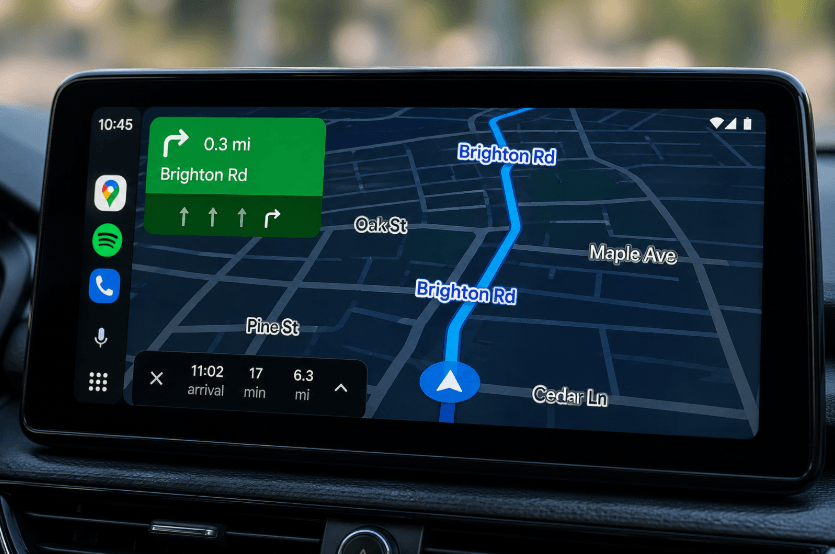
Google Maps is rolling out a subtle but practical update for drivers using Android Auto, making street names easier to read at a glance. The change is part of Google’s broader push to improve in-car navigation, especially as infotainment systems become more central to everyday driving in the United States.
Clearer Street Labels Enhance Navigation
Bigger, More Visible Labels Along Routes
For years, Google Maps has displayed street names during navigation, but those labels were often small and difficult to read unless they marked an upcoming turn. With the latest update, street names along and near your route are now significantly larger when using Android Auto.
The redesign introduces a clearer visual hierarchy. Streets that are part of your active route appear with bold blue labels outlined in white, making them stand out prominently on the screen. Nearby roads—those adjacent to your route—are shown in gray with the same white outline, offering context without overwhelming the display.
This adjustment is especially useful in dense urban areas or unfamiliar neighborhoods, where quickly identifying cross streets can help drivers stay oriented without distraction.
Part of Google’s Immersive Navigation Redesign
A Step Toward Smarter In-Car Interfaces
The update is tied to Google Maps’ broader “Immersive Navigation” redesign, which aims to make navigation more intuitive and visually accessible. As more drivers rely on Android Auto for real-time directions, features like improved labeling can reduce cognitive load and enhance safety by minimizing the need to squint at the screen.
In practical terms, this aligns with trends in the U.S. auto market, where larger infotainment displays and integrated navigation systems are becoming standard in both new and mid-range vehicles.
Limitations of the Current Rollout
Only فعال During Active Navigation
Despite its usefulness, the feature currently has a notable limitation: the larger street labels only appear when turn-by-turn navigation is active. If a driver is պարզապես browsing the map without setting a destination, the enhanced labels disappear, reverting to the smaller, traditional view.
This restriction may reduce the feature’s utility in everyday scenarios, such as casually checking nearby streets or navigating without a preset route—situations where larger labels could arguably be even more helpful.
Why It Matters for Drivers
For commuters, road trippers, and rideshare drivers alike, clearer map labeling can make a meaningful difference. Being able to quickly identify surrounding streets without zooming in or diverting attention from the road supports safer and more efficient driving.
As navigation apps continue to evolve, even small interface tweaks like this reflect a broader shift toward user-centered design—prioritizing clarity, accessibility, and real-world usability.
Conclusion
Google Maps’ updated street labeling on Android Auto may seem like a minor change, but it addresses a long-standing usability issue. By making street names more visible during navigation, Google is improving the driving experience in a practical way. Expanding this feature beyond active navigation could make it even more valuable, especially for drivers who rely on quick visual cues to stay oriented on the road.